Vibe Coding & AI Video Training: Why Pay When Tutorials Are Free?
Compare free tutorials with FollowAI training: build your own project, get feedback, waste fewer tokens and create AI videos clients can actually use.
On this page
You follow a tutorial. The AI builds a decent-looking page. You ask it to add a form, and somehow the menu breaks. Five attempts later, a chunk of your usage allowance is gone and there is still nothing you would send a client.
Or you generate a slick product video, except the packaging changes halfway through and the caption drifts off-screen. Nice first frame. Awkward finished ad.
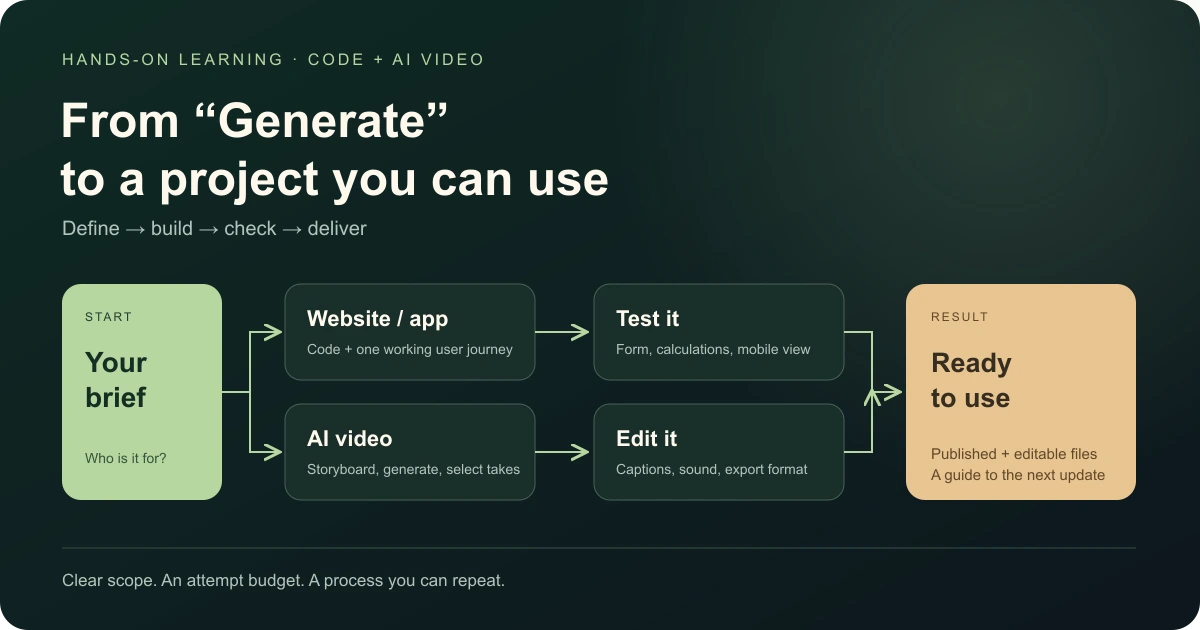
Vibe coding and AI video training should help you get past that point: build something you can use, show in a portfolio or offer to a client. A service website with a working enquiry form and a short video promoting the same offer is one practical starting point.
Free tutorials are useful. Paid training needs to add something worth paying for. Here is what that means at FollowAI.
The tutorial ends before your project does
Vibe coding means building and changing software by giving tasks to an AI coding agent. You describe what you need, it works on the code, and you check what actually happened. You still make decisions about scope, behaviour and whether the result works.
A tutorial usually follows a prepared example. Your files, computer and requirements will be different. Then a client asks for “something like that, but with a few changes.” There goes the neat demo.
Now you need to narrow the task, diagnose the error, save a working version, connect the right service and check the published result. With supported learning, you have somewhere to bring the actual thing you are stuck on.
We use free documentation too: OpenAI’s Codex guidance, Anthropic’s working practices and Runway Academy. Keep those resources whichever learning route you choose.
| What you need | Free resources | FollowAI: self-paced | FollowAI: with support |
|---|---|---|---|
| Understand the tool | Documentation and examples | Short lessons in a prepared sequence | Lessons and a route matched to your task |
| Build a first project | Choose your own scope and route | Starter files, exercises and an example project | One agreed task with personal examples |
| Work through a problem | Investigate and compare instructions yourself | Common fixes and self-checks | Share files, screenshots or a recording for feedback |
| Keep improving it | Assemble your own process | Keep the project, instructions and update guide | The same materials, plus feedback during the support window |
If you enjoy figuring things out independently, free resources may be enough. Choose the self-paced course for a ready-made sequence. Choose support when you want to apply the lessons to your own task and get feedback along the way.
What you learn beyond the Generate button
The useful skill is repeating the process on your next project: define the task, build a version, spot a problem, fix it and check it.
Take a website for a repair business. The first version has three jobs: explain the service, show examples and collect an enquiry. Get that path working before adding accounts, loyalty points and “just a small marketplace.”
For video, start with the audience, offer and shots. Generate the material, select what works, then bring it together through editing, captions and sound.
Here is a real example from our own work. Search phrases in an internal FollowAI panel started displaying almost one letter per line. A shared style rule had stretched the checkboxes across the available width, leaving the words a few pixels of space. We fixed that rule and checked wide and mobile layouts.
That is ordinary, useful AI development: find the cause and verify the fix. Asking the agent to redesign the whole section could have created much more work. Our website and Knowledge section are other examples you can open and inspect.
Stop burning tokens on “try again”
Token usage includes the context the model processes: instructions, messages, files and tool results, as well as its output. A tiny “please fix it” message in a huge session can still carry plenty of context.
API billing and subscription allowances work differently. Using fewer tokens does not automatically refund a subscription. The aim is to get more useful work out of your available budget.
1. Give the task a boundary
“Explore the whole project and improve everything” invites a long wander. Name the action, relevant files and a clear finish line. Ask for a short plan when the work is unclear.
Fix the enquiry form on the service page.
Problem: clicking Submit does not add the enquiry to the table.
Start with the form component and its submission handler.
Check a normal submission and a missing required field.
Leave the design of other pages alone.
Show what changed and how you checked it.
This original example gives the agent both a starting point and a way to verify completion, consistent with OpenAI’s prompting guidance.
2. Send relevant evidence
For a bug, provide the steps that reproduce it and the relevant error output. For a layout problem, use a clear screenshot. Ask the agent to search for the function it needs before reading piles of files. Random logs are expensive clutter.
3. Keep permanent instructions short
Record how to run the project, where the main files live and how to check changes. Codex supports AGENTS.md; Claude Code uses CLAUDE.md. Keep everyday rules there and detailed, occasional procedures elsewhere. Avoid pasting your entire project history into every request.
4. Watch context and usage
In Claude Code, /context helps inspect context usage, /usage shows usage information and /compact summarises conversation history. Save decisions, constraints and the next step before resetting or summarising a session. Check the current cost documentation for available commands and account-specific indicators.
5. Match the effort to the job
Moving a paragraph and diagnosing a tricky integration need different levels of work. Where your service offers model or reasoning controls, choose them for the task. A cheaper setting that needs ten retries can be a false economy.
Check the main user journey after a small change. If attempts keep repeating the same failure, stop and improve the diagnosis. Save working versions in Git so you can recover them. Keep the checks; cut the pointless back-and-forth.
These habits help control the work. They do not promise a fixed percentage saving on every project.
AI video has its own version of burning the budget
Video services often charge credits based on the model, duration and settings. Check the displayed cost before generating; Runway’s plan documentation gives examples.
Suppose you are making an ad for a coffee brand. Is the offer about flavour, gifting or delivery? Settle that before asking for something “premium and cinematic.” Sketch three shots: the product, a recognisable use and the offer.
- Approve the starting frame. Check composition, packaging and space for text before paying to animate it.
- Give the shot one main action. For image-to-video, the image establishes the visual starting point; the prompt directs movement. See Runway’s prompting guide.
- Give each retry a reason. “The camera moves too fast” tells you what to change. “Make it more wow” does not.
- Set an attempt budget. When a shot keeps failing, change the plan or source image instead of buying another batch of the same problem.
- Finish in an editor. Add controlled captions, your real logo and the call to action. Watch the export on a phone, including with sound off.
In our AI video workshop, the deliverable is one 20–30 second vertical ad with three opening variants. Those variants can be proposed for testing. Buying ad traffic and guaranteeing campaign performance are outside the workshop.
Projects you could offer as paid work
A client needs a usable outcome: an enquiry, a clearer product story or less repetitive work. Build the offer around that outcome.
These are possible commercial projects, not invented student success stories. Learn to deliver and check a manageable version before selling it.
| Project | Possible buyer | What they pay for | What to demonstrate |
|---|---|---|---|
| Service website with an enquiry form | A tradesperson, studio or local service | A clear offer, examples and a contact path | Mobile layout and the complete enquiry journey |
| Preliminary price calculator | An installer, manufacturer or agency | An estimate based on agreed rules | Checked calculations and clearly stated limits |
| Enquiry intake bot | A shop or service company | Useful questions, saved details and handoff to staff | Incomplete answers and a failed connection |
| Recurring report helper | A team combining similar spreadsheets | Defined inputs and a report they can verify | Totals that match the source files |
| Short video creative package | A brand, shop or local business | Script, edit, opening variants and agreed exports | Consistent product details, readable copy and editable files |
You can combine the skills into a practical package: a service page plus a short video for the same offer. Agree on the message, development scope, number of videos and revision rounds before starting.
Start with something you can repeat reliably. Payments, personal data and complicated access rules call for deeper engineering and review.
Count the costs and your hours
A hypothetical example: you agree a $300 project, spend $40 on tools and generation, and use eight hours across communication, production and revisions. That leaves $260 before tax and other costs, or $32.50 per recorded hour. If the work expands to 20 hours, it becomes $13.
This is arithmetic, not a market-rate claim or income forecast. It shows why scope, generation budgets and clear acceptance criteria matter. Finding and winning the client takes work too.
FollowAI training: what you get and what it costs
Starting prices below are in USD, verified on 17 October 2026. We confirm the scope, start date and terms before payment. AI subscriptions, paid tools and hosting are separate.
| Format | From | What you receive |
|---|---|---|
| Self-paced Codex and Claude Code course | $349 per person | Short lessons, starter files, exercises, reusable instructions and an update guide. Around 4–7 hours of practice; personal tutoring is not included |
| Learn on your own task, with support | $349 per person | A plan for one agreed task, personal examples, project files and feedback. Around 4–7 hours of practice, with support for up to 10 calendar days from the agreed start |
| AI Video Ad Sprint | $299 per participant | Three 90-minute sessions over 14 days. One 20–30 second ad with three openings, an editable project and exports. Planned groups of 4–6 |
With personal support, we reply in chat by the next working day. Short screen recordings help explain tricky steps; up to two short calls are available when needed. You do the practice and make changes yourself.
The video workshop includes up to 45 minutes of creative review and session recordings for 90 days. The three openings belong to one base ad. A complete campaign and media buying are a different scope.
The self-paced course gives you a prepared learning route. The supported format adds work around your particular task. Choose the gap you actually need to close.
Bring a project you want to finish
“I want a landing page for my service.” “I need a bot that saves enquiry details.” “I want a usable product video instead of another weird generation.”
That is enough to start a useful conversation. FollowAI prepares the learning route and materials; in the supported format, we review your work as you build.
Explore vibe coding training with support · See the AI video creation workshop.
If you want a finished website, app, bot or video delivered for you, FollowAI can take on the build and launch. We agree on the features, integrations, checks and ongoing service for the project: custom development and AI systems.